To record a dividend payment, perform three steps:
Step 1
Check that you have entered all transactions for the financial period related to the dividend. This includes the corporation tax expense; to record this expense, create a General Transaction from the Corporation Tax Liability account to the Tax Expense account.
Step 2
Check that the dividend amount is less than the Equity balance as required by UK law. Click menu Window > Accounts and locate the Equity balance:
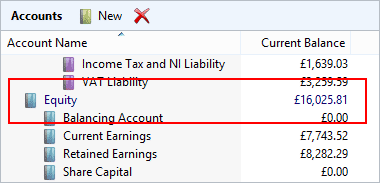
In the example above the dividend amount should not be greater than £16,025.81.
Step 3
To record the dividend payment, click menu item File > New > General Transaction. Set the From Account to 'Cheque Account' and the To Account to 'Retained Earnings'.
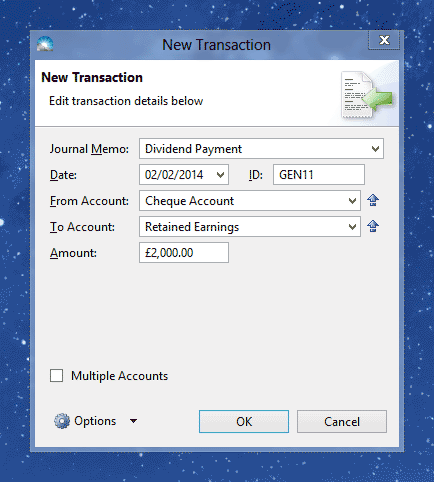
Fill in the other fields and press OK. The transaction will appear in the Transactions list (accessible by clicking menu Window > Transactions).
