To record an invoice payment to a supplier, click File > New > Money Paid Out. The Money Paid Out window will appear:
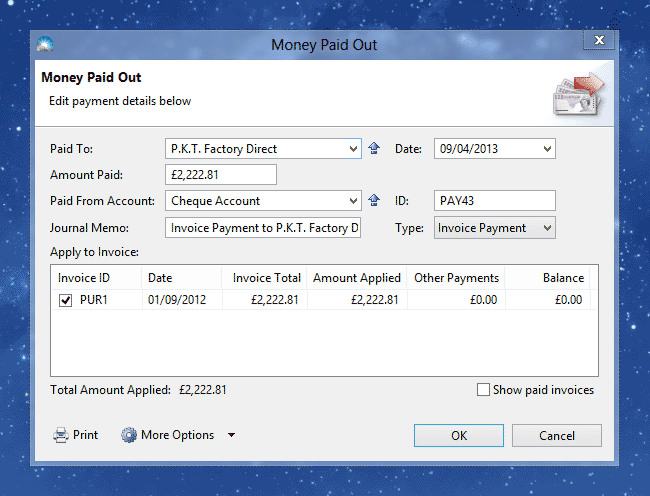
Note: The Type will default to 'Invoice Payment' only if there are outstanding invoices with the supplier.
Enter the details into the following fields:
Paid To: Enter the supplier name. If there are oustanding no invoices with this supplier the payment Type will default to 'General Payment' – see How to Record an Expense.
Date: The date you made the payment.
Amount Paid: The amount of money you paid to your supplier.
Paid From Account: The account used you paid the supplier, eg. 'Petty Cash' or 'Mastercard'.
ID: A unique number for this payment.
Journal Memo: A description of this transaction for your records.
Type: This is the type of payment. If there are outstanding invoices with the supplier, this will default to 'Invoice Payment'.
Apply to Invoice: Tick the invoice to apply the payment to.
Total Amount Applied: This is the total of the 'This Payment' column and must match the 'Amount Paid' field.
Show paid invoices: Tick this box if you wish to apply the payment to a paid invoice. Note that this will result in the invoice being overpaid.
Click 'OK' to save the invoice payment. The new transaction will appear in the Transactions list (menu Window > Transactions).
