Note: This text refers to Corporation Tax paid by companies.
To record your corporation tax liability, click menu File > New > General Transaction:
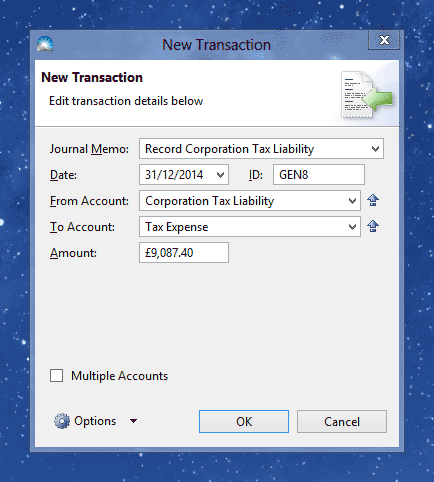
Enter the details of your tax liability into the following fields:
Journal Memo: A description of the transaction for your records, e.g. 'Record Corporation Tax'.
Date: Enter the last day of the financial year for which the tax expense is calculated.
From Account: Enter 'Corporation Tax Liability' - this account tracks how much money is owed to HM Revenue and Customs.
To Account: The expense account, usually 'Tax Expense'.
Amount: The amount of the tax liability for the year.
Once you've entered the tax liability details, click OK to save it. The new transaction will appear in the Transactions list (menu Window > Transactions).
When you come to paying the tax liability to HM Revenue and Customs, you must enter another transaction to record the payment. Click File > New > Money Paid Out:
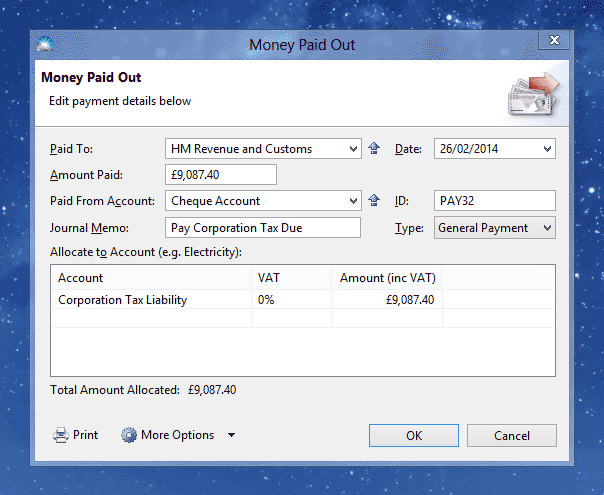
Enter the same details as for an expense, except allocate to 'Corporation Tax Liability'. If you are registered for VAT, click 'More Options' and set the VAT Treatment to 'Out of Scope'.
Click OK to save the payment. The new transaction will appear in the Transactions list (menu Window > Transactions).
