Many businesses offer customers a discount if they pay their invoices early. When you offer an early payment discount you should charge VAT only on the discounted amount, even if the customer doesn't take advantage of the early payment discount offer. See VAT Notice 700 (Section 7.3.2) for details about the VAT treatment of discounts.
To record an early payment discount in Solar Accounts, follow these two steps:
Step 1: Offer the discount on your invoice
Create an invoice as normal, and include details of the discount offer in the Comment field (eg. "5% discount if paid within 14 days").
Step 2: If your customer pays early, apply a credit to the invoice
Create a credit note by clicking menu File > New > Credit Note:
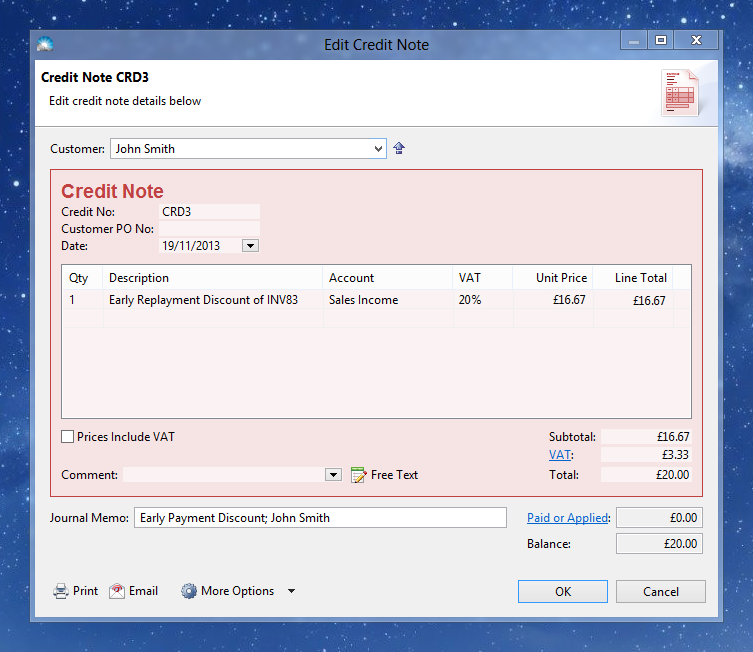
Click OK to save the credit note. Then select the credit note in the Invoices list and click menu File > New > Allocate Selected Credit:
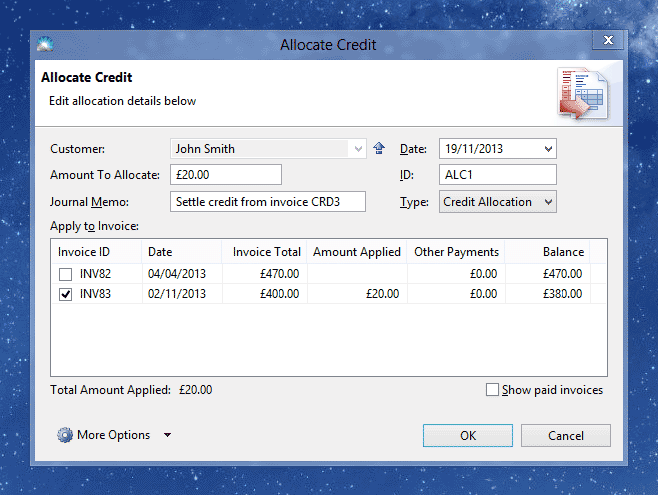
Tick the invoice to receive the early payment discount and click OK.
Finally record the reduced invoice payment in the normal way.
