If you make non-business payments from a business account you should record this as a payment to the business owner. To do this, click menu File > New > Money Paid Out:
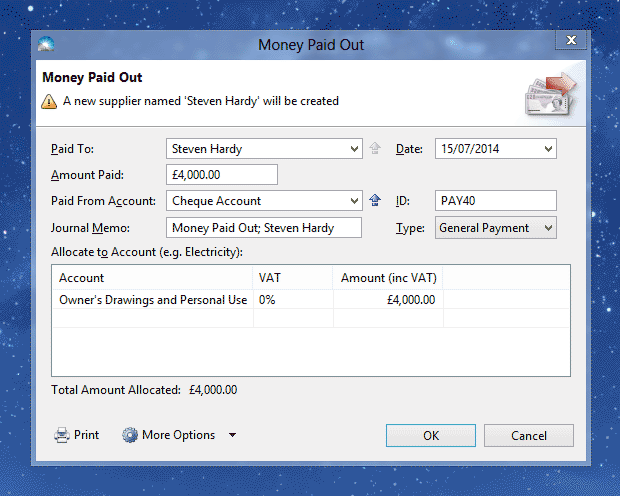
Enter the details into the following fields:
Paid To: Enter the name of the beneficiary (this is usually the business owner).
Date: The date of the payment.
Amount Paid: The amount of money you paid.
Paid From Account: The account used to make the payment, e.g. 'Cheque Account' or 'Mastercard'.
ID: A unique number for this payment.
Journal Memo: A description of this transaction for your records.
Type: For a non-business payment this should be 'General Payment'.
More Options > VAT Treatment (only shown if registered for VAT): This should be set to 'Out of Scope' because payments to owners are not affected by VAT.
Allocate to Account: This is the account used to track payments to business owners. If the payment benefits a company director, this should be 'Directors Loan Account'. For a partner in a partnership or self-employed individual this should be 'Owner's Drawings and Personal Use'.
VAT Column (only shown if registered for VAT): This should be set to '0%' because payments to owners are not affected by VAT.
Amount Column: The amount of the payment.
Click 'OK' to save the payment. The new transaction will appear in the Transactions list (menu Window > Transactions).
