Note: This text applies to businesses which are registered for VAT. If you are not registered for VAT, click here.
As a subcontractor covered by the construction industry scheme, you should create a credit note to record the CIS deduction for tax and NI.
Step 1: Create an invoice
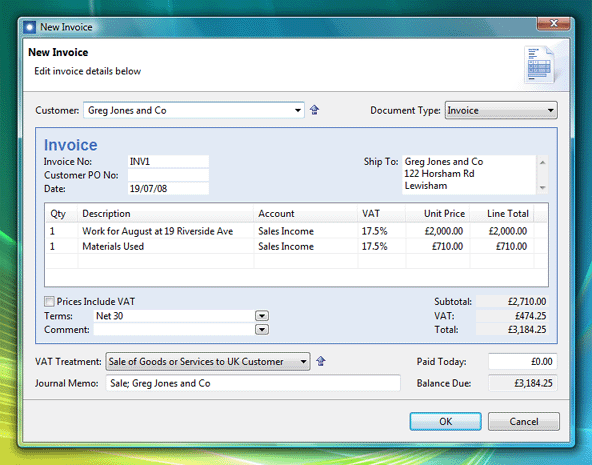
Click menu File > New > Invoice, then enter the usual details for an invoice:
Step 2: Create a credit note
Click menu File > New > Credit Note, and enter the details of the CIS deduction:
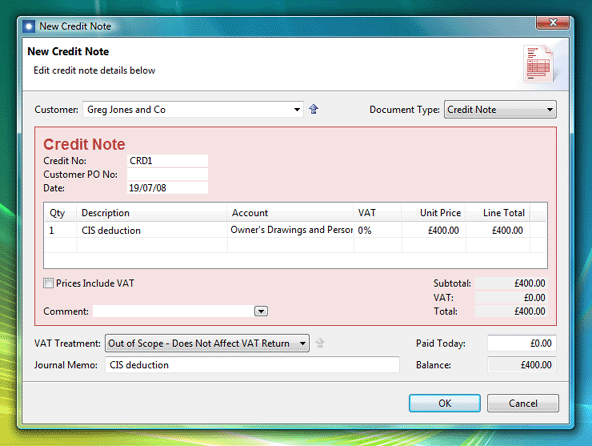
If you are self-employed or in a partnership, the account should be 'Owner's Drawings and Personal Use'. For a company the account should be 'Income Tax and NI Liability'. Note also the VAT Treatment should be 'Out of Scope'.
Step 3: When you receive payment, allocate the credit note to the invoice
Select the credit note in the Invoices list and click File > New > Allocate Selected Credit. Tick the invoice to receive the deduction:
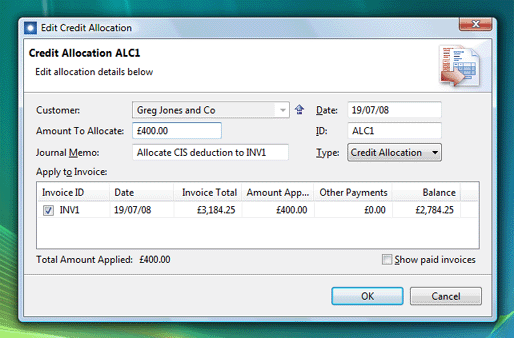
The net result of these transactions is to reduce the amount payable on the invoice, and reduce the tax payable to HM Revenue and Customs.
